
VeilVoice: irreversible voice de-identification
VeilVoice destroys the biometric voiceprint of a speaker, meaning pitch, formants, timbre, micro-timing and the melody of an accent, so that neither software nor a human can re-identify them or reconstruct the original voice, while the words stay clean and transcribable.
WHAT HAPPENS TO YOUR RECORDING
What this picture does not show is the limit. The voiceprint goes; what you said stays, because the output is meant to be listened to and transcribed. If the words themselves identify you: a name, a place, a story only you could tell. VeilVoice has not touched that and does not claim to. Segmental accent cues, which phonemes you actually produced, survive for the same reason. See security and cryptography for the full scope.
WHAT IT ACTUALLY DOES
Anonymise a recording
wav, mp3, flac, ogg, m4a in, a clean WAV out, with metadata stripped. Roughly 90× faster than real time.
Scramble a microphone live
Route the veiled voice into a virtual audio cable and every application on the machine, whether calls, streams or recorders, receives it instead of you.
Encrypt at rest, by default
Every recording is sealed as it is written, using an X25519 + ML-KEM-768 hybrid, so one captured today is not readable by a quantum adversary tomorrow. Turning that off makes you read why first.
Lock the app
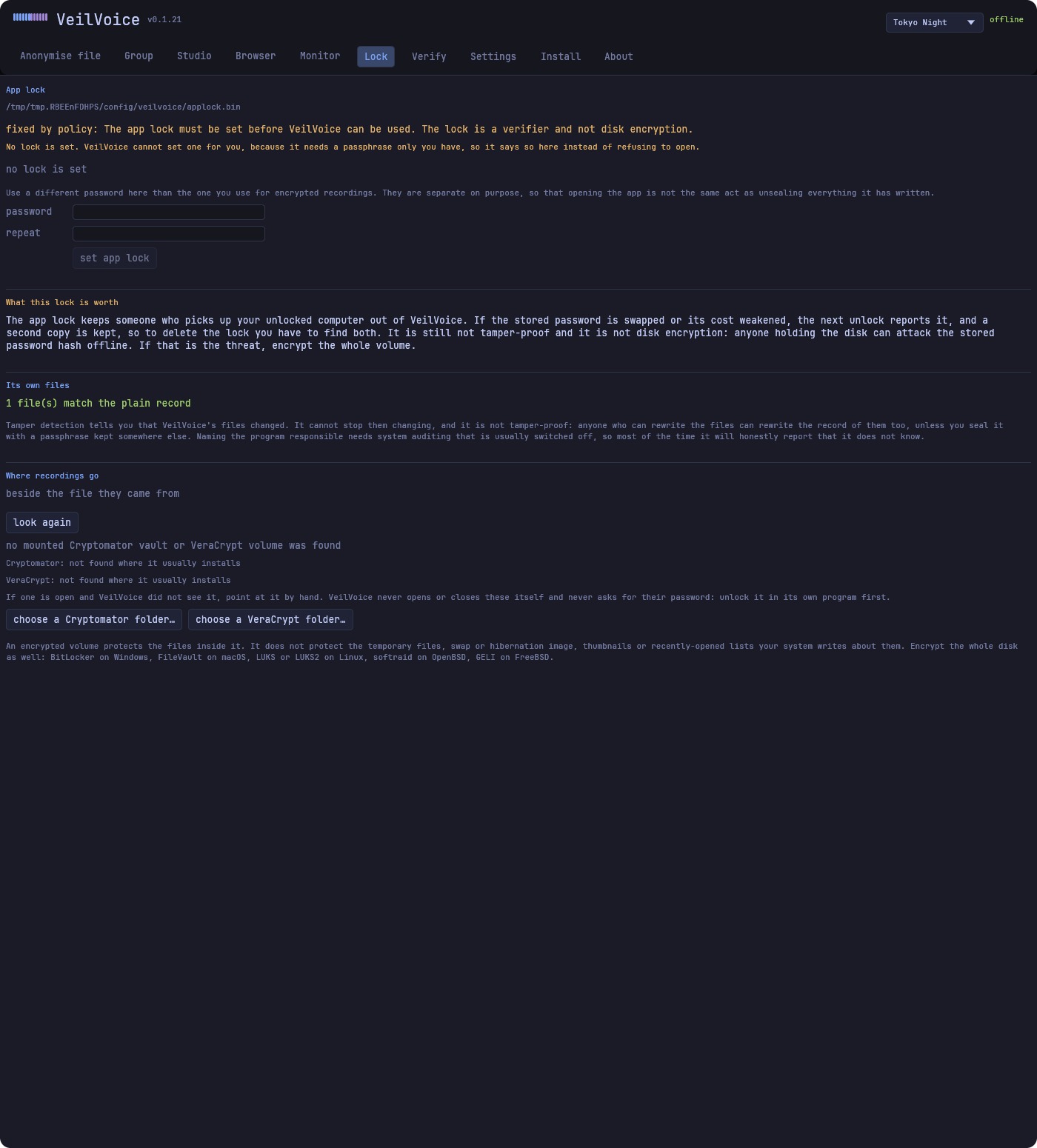
A separate password gates the desktop app, rate limited and Argon2id-derived. It stops someone who picks up your unlocked computer. It is not tamper-proof, and the unlock screen says so.
Strip metadata
Audio tags, image EXIF and GPS. A de-identified voice is worthless if the file still says who recorded it, where, and on what.
Work as a Rust library
Every crate is a normal dependency. The engine is allocation-free and safe to call from inside an audio callback.
Transcribe without giving up your voice
Speech-to-text needs the words, not the voiceprint. Anonymise first and the service gets speech it can transcribe and a voice belonging to nobody.
See what is listening
Which applications are holding your microphone or camera, right now, with an alert the moment one starts. De-identifying a call achieves little if a second program is recording the raw microphone beside it. macOS exposes no interface for this, so nothing is reported there rather than something guessed.
Detect tampering with its own files
A signed manifest of what VeilVoice should be, and a check that reports what changed. Where the system's own auditing allows it, it names the program responsible, and says plainly when it cannot see, rather than implying nothing happened.
Erase a recording
Overwrite and unlink, with an honest account of what that is worth. On flash storage the controller may have written the data somewhere the filesystem can no longer reach, so this is not a guarantee and is not described as one.
Verify a download without GnuPG
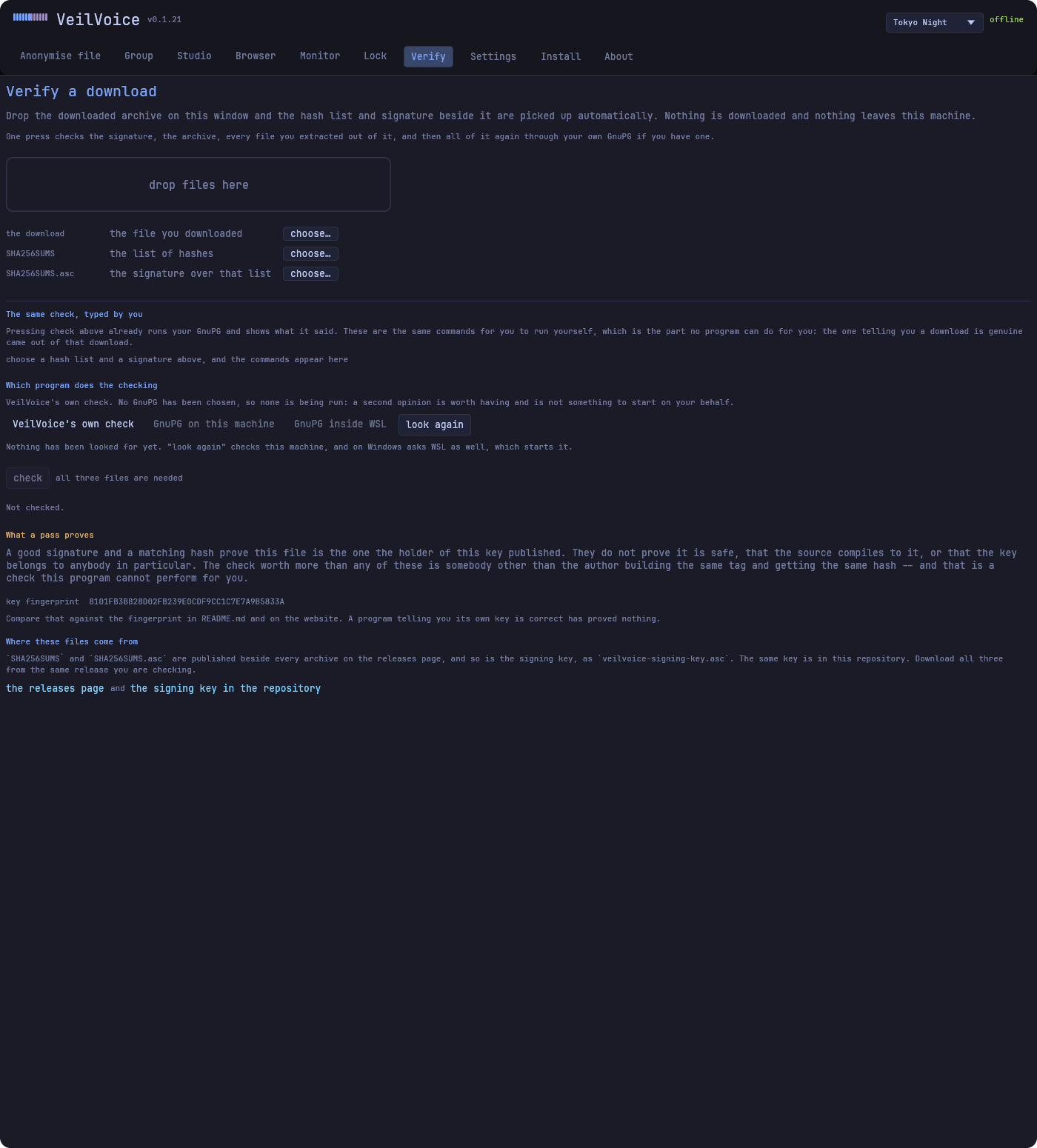
veilvoice verify is part of the program you downloaded, and the desktop application's Verify tab runs the same code. The signing key is compiled in, so it checks the signature over the hash list and then the file on a machine with no GnuPG and no network. It distinguishes a download being intact from a build being reproducible, because those are different claims.
Honest scope. “Fill the spectrogram with noise” and “stay understandable” are mutually exclusive, because noise that covers the voice covers the words. VeilVoice targets the achievable goal: irreversible speaker de-identification with intelligibility preserved on purpose. If the message must also be secret, encrypt it; that is a separate problem with a separate answer.
The same applies to accent. Its melody and colour do not survive. What no signal-level transform can change is which phonemes you produced, and at that level the accent and the words are the same thing, so a strong regional accent may still be audible.
DOWNLOAD
Latest release: see GitHub. Every binary is built twice in separate directories and verified byte-identical before it ships.
Files in the latest release
- The current list of files is on the releases page.
Always verify before you run it. A download can be corrupted in transit or replaced entirely. Two independent checks are published with every release: a SHA-256 for each file, and an OpenPGP signature over that hash list. The in-browser verifier does the first one for you.
SO YOU HAVE DOWNLOADED IT, NOW WHAT
There are two programs in the archive: veilvoice-gui, the
desktop app, and veilvoice, the command line. They share one
engine, so anything one can do the other can. Nothing installs a service,
writes to a registry, or phones home. Delete the folder and it is gone.
-
Give it a recording
wav, mp3, flac, ogg, m4a and friends. Open the desktop app on the anonymise file tab and choose one, or point the command line at it. Roughly 90× faster than real time, so an hour of audio takes well under a minute.
veilvoice anonymise interview.mp3 -o clean.wav -
The voiceprint is destroyed, the words are kept
Each frame's measured phase is thrown away and resynthesised, and pitch register, vocal-tract length and spectral tilt are each collapsed onto one canonical value, so a whole population of speakers lands on the same output and there is nothing left to invert. What comes out is understandable, transcribable, and belongs to nobody.
The same energy, and no shared structure. Left, a voice as it was recorded; right, what is left after the phase relationship that identified the speaker has been destroyed. The words survive the journey; the speaker does not. -
It is encrypted before it reaches the disk
The result is sealed into a
.veilcontainer as it is written, so-o clean.wavproducesclean.wav.veil. The WAV is built in memory and encrypted there, so the plaintext never exists on disk, not even for a moment, because a file that is written and then deleted cannot be reliably taken back on flash storage.veilvoice decrypt clean.wav.veil -o clean.wav # when you want it back -
Or scramble your microphone as you speak
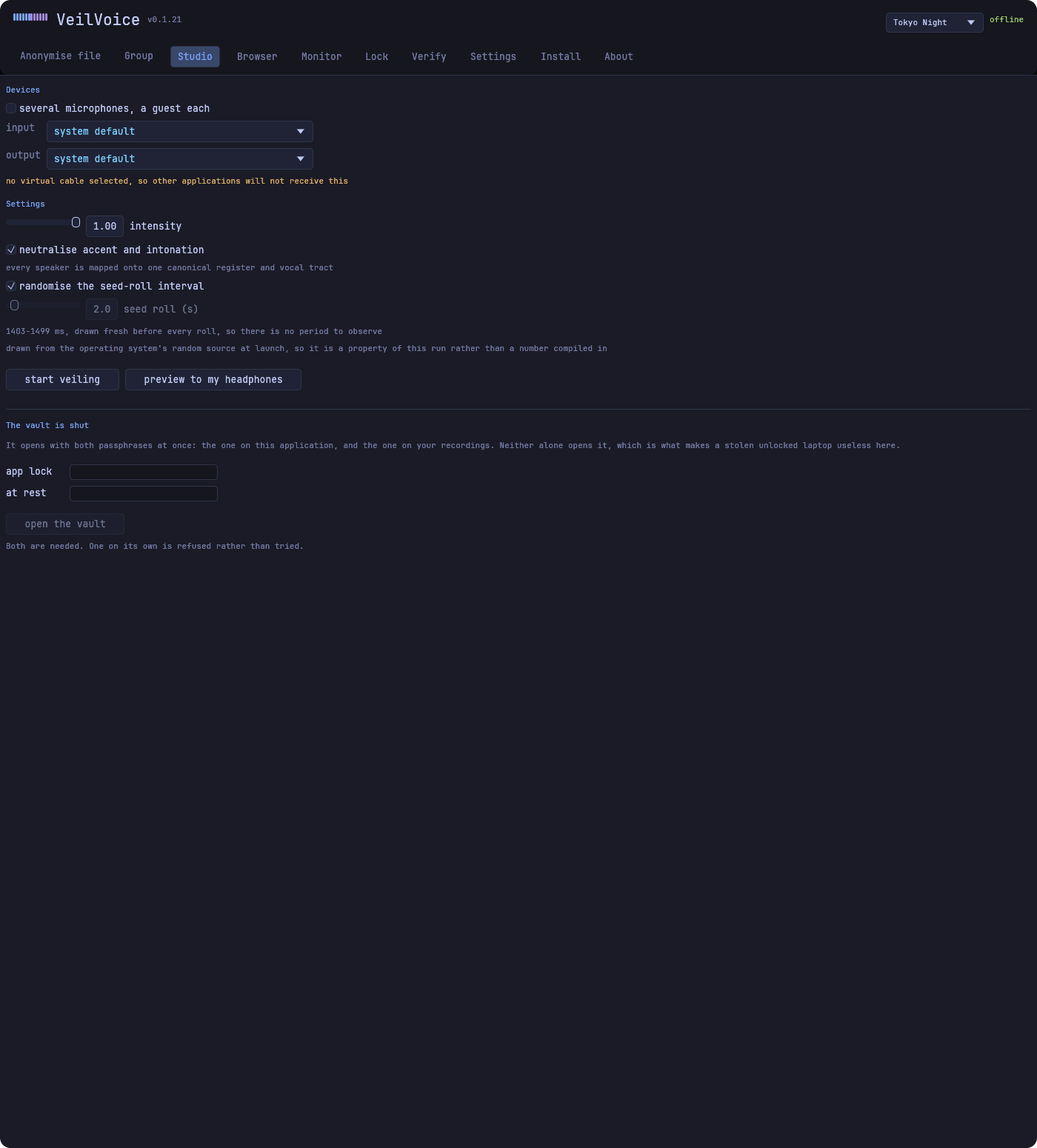
The Studio tab routes your veiled voice into a virtual audio cable. Every application on the machine, whether a call, a stream or a recorder, then receives that instead of you, with no per-app setup. The same tab keeps a take of it, sealed into a vault, when you ask for one.
-
Check nothing else is listening
De-identifying your voice on a call achieves little if a second program is recording the raw microphone at the same time. The monitor tab names what is holding your microphone and camera and warns the moment something starts.
-
Lock the app behind you
Set a password on the lock tab and VeilVoice will not open without it. The lock button in the header locks it immediately and clears the session passphrase with it.
The two passwords, and why there are two
The app lock
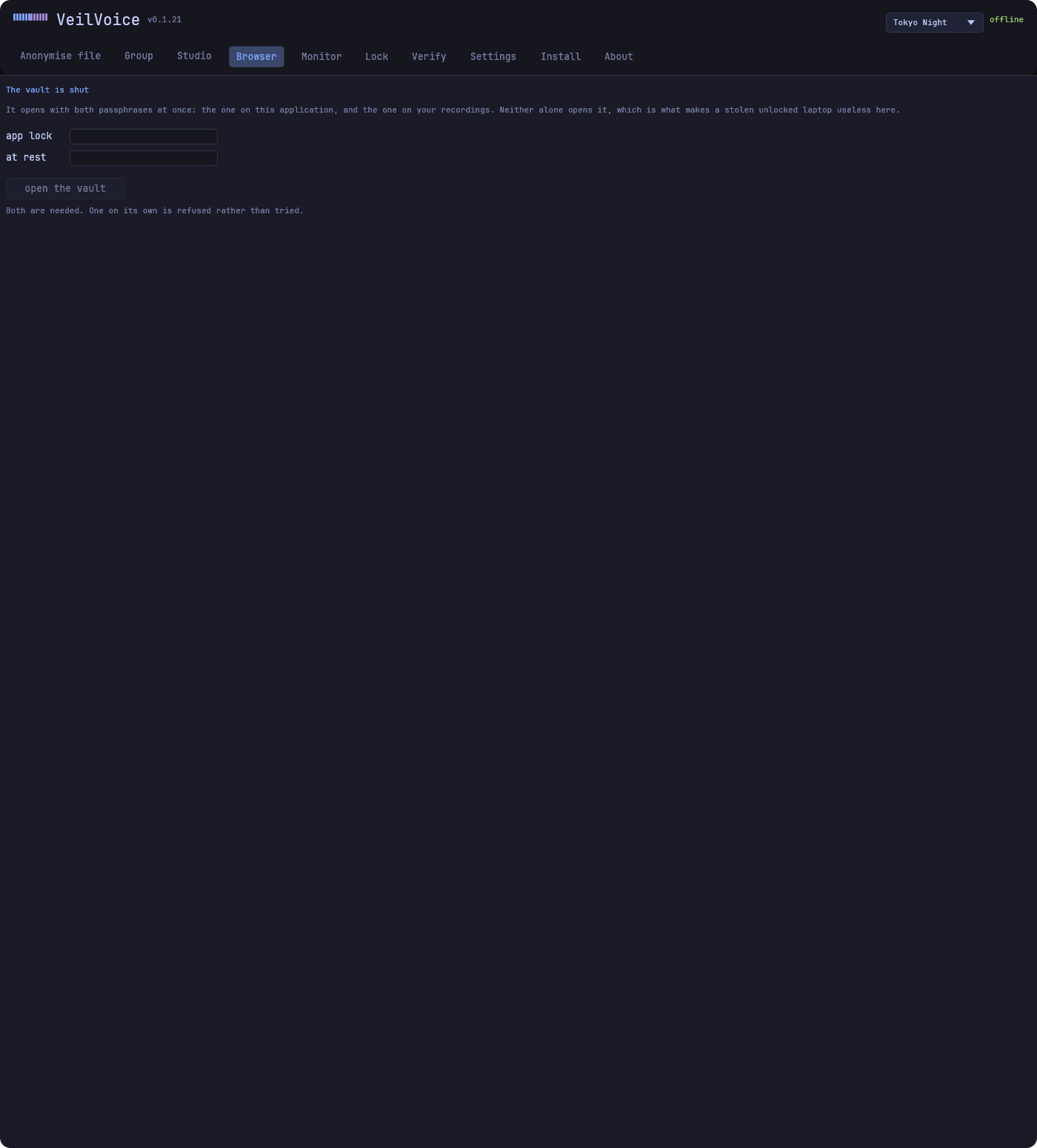
Decides whether VeilVoice opens at all. Argon2id verifier, rate limited, three attempts free and then a doubling wait.
The recording passphrase
Encrypts the files it writes. Argon2id at 256 MiB, or seal to a post-quantum hybrid public key instead.
They are deliberately different secrets. If one password did both, then opening the app would be the same act as unsealing everything it had ever written, which is the opposite of what a lock is for. VeilVoice keeps the two derivations domain-separated, so typing the same passphrase in both places still does not produce two copies of one value. Use two anyway: one guess that opens both defeats the point regardless of the maths.
The app lock is not tamper-proof, and cannot be. A program running on your computer has nowhere to hide a secret from that computer: anyone who can write to your files can delete the lock, and anyone holding the disk can attack the stored password hash offline. It protects against casual access, meaning the person who sits down at your unlocked session, which is a real and common threat, and is exactly what the unlock screen says it is for. If someone taking your disk is the threat, encrypt the whole volume.
WHAT IT LOOKS LIKE
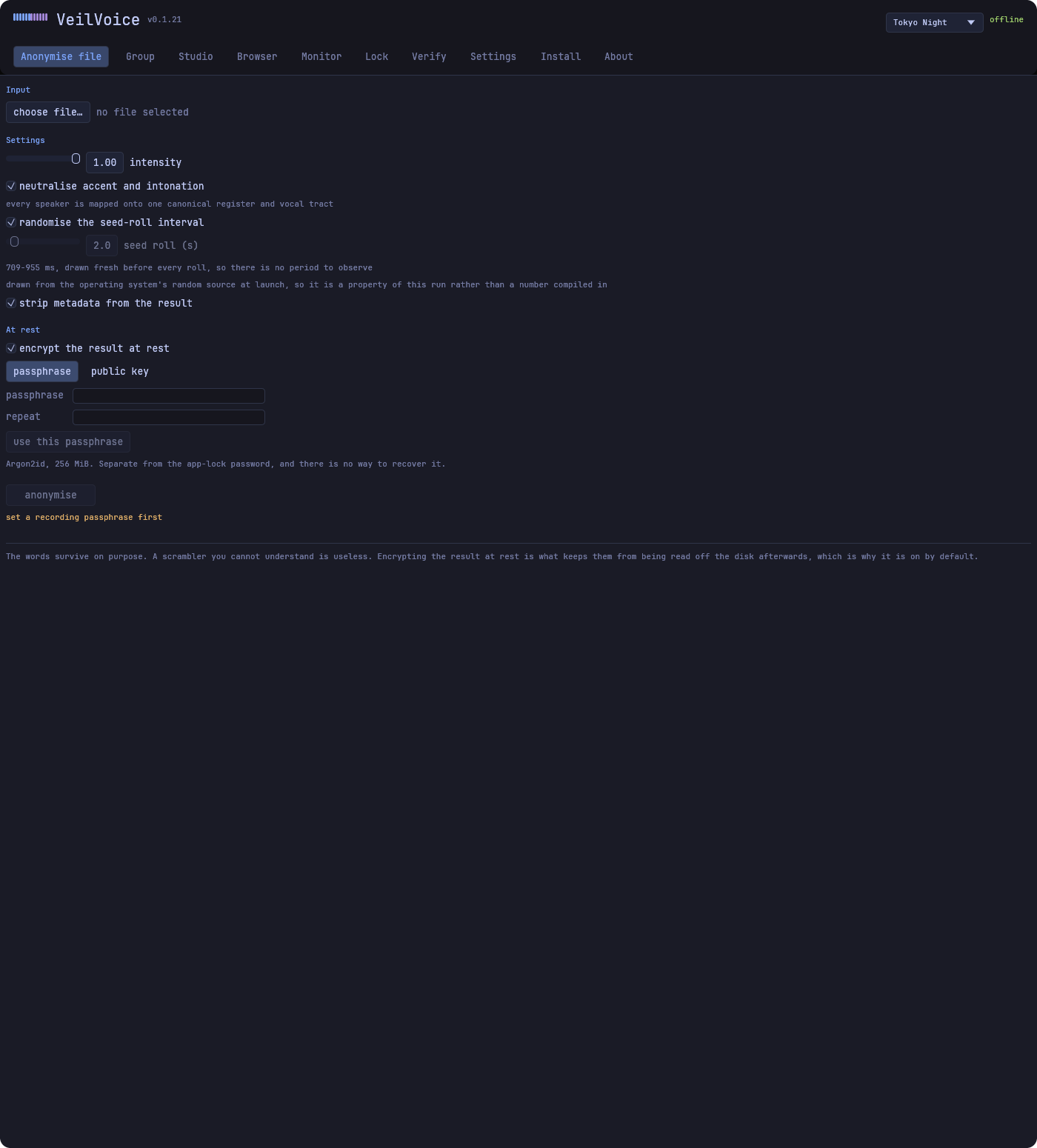
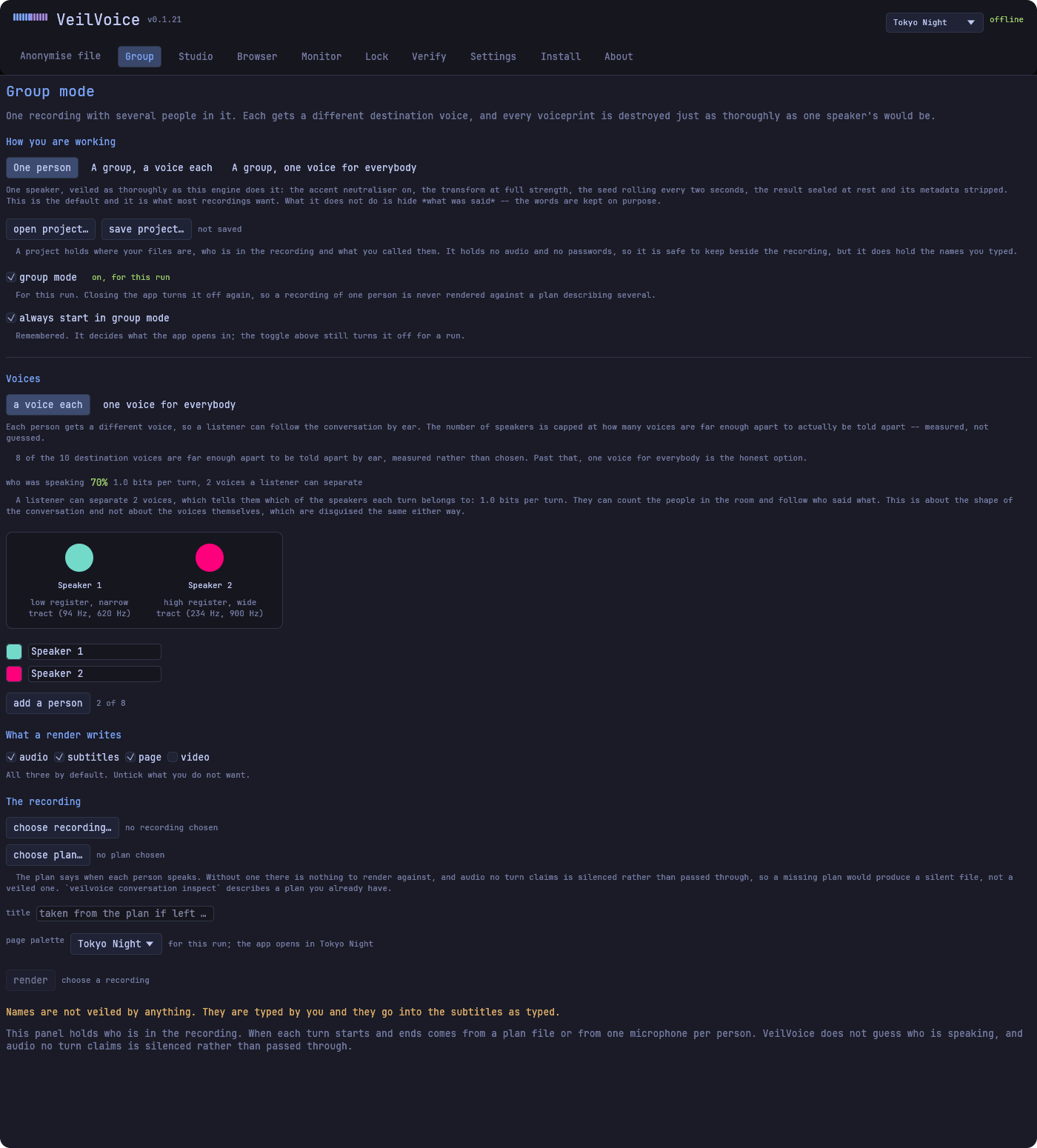
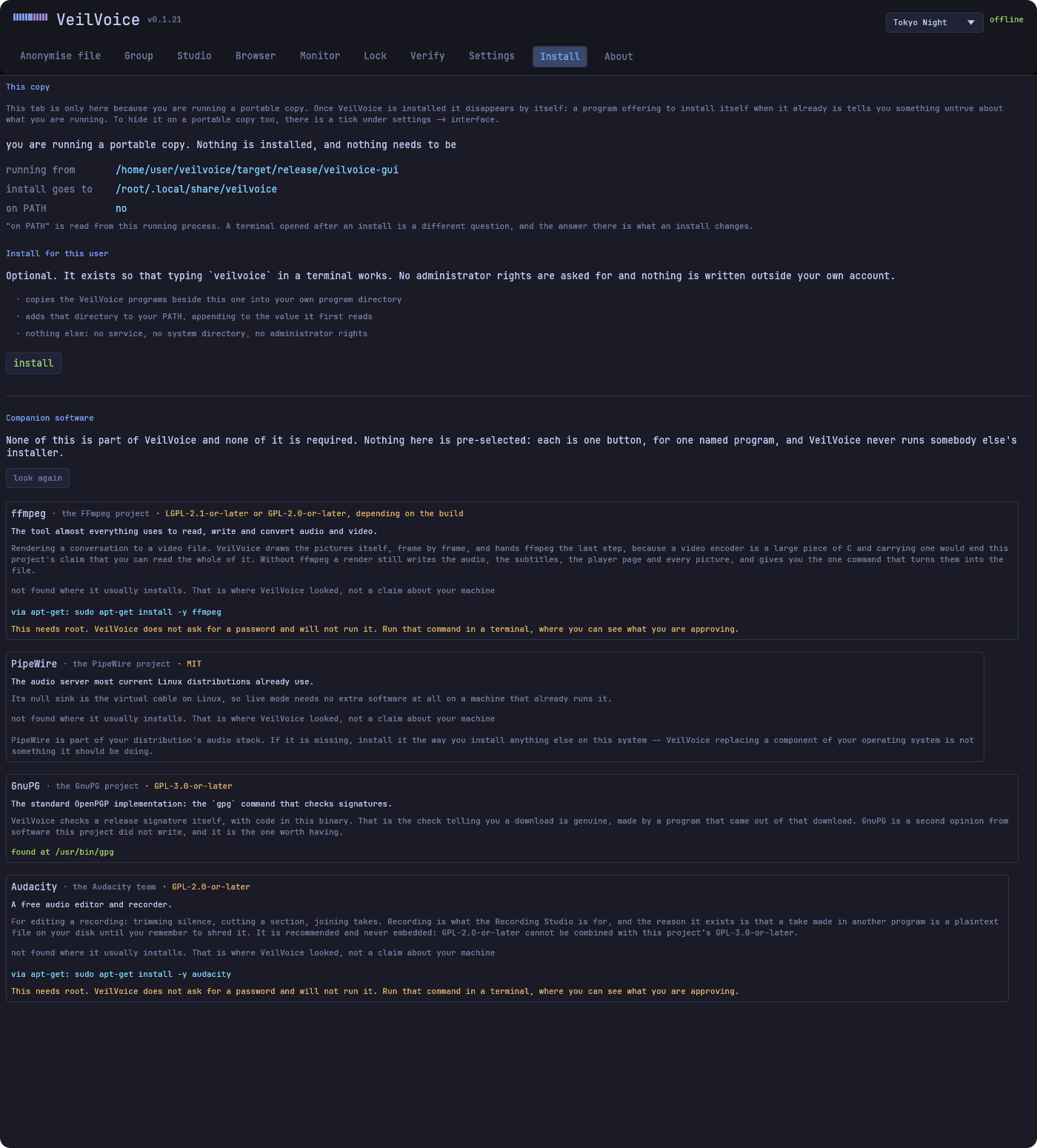
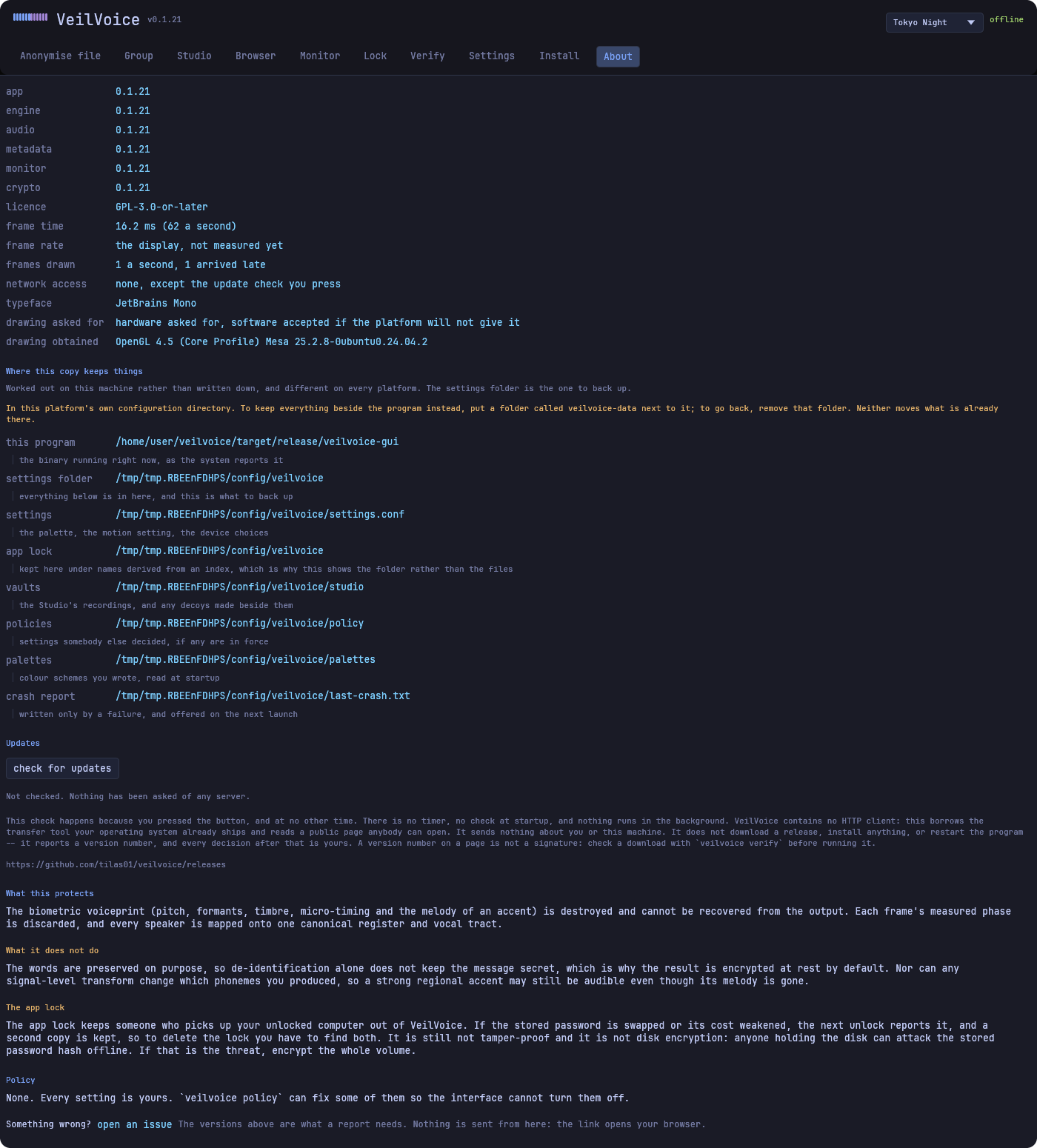
Every picture here is of the current build. The window captures are taken by a script that drives the release build and photographs each tab, and the terminal drawings are generated from the command output committed beside them, so a picture that disagrees with the program fails the build rather than sitting here saying something untrue.
Every one of these is below in the demonstration too, one at a time and larger. Go there to watch the command line type itself out first.

The command line
Everything the window does, and some things it does not. These are drawings rather than photographs: they follow your palette, and the text in them can be selected and searched.


WHAT IT SOUNDS LIKE, IN ONE PICTURE
The bars marked “normal voice” are in step with one another. That shared phase relationship is most of what makes a voice recognisable as yours: the precise waveform, the micro-timing, the way your vocal tract shapes every harmonic.
The bars marked “anonymised voice” carry the same energy and none of the relationship. The list between them is what actually happens, in order, and it is six steps rather than one:
- Framed. The audio is cut into overlapping frames of 1024 samples and each one is turned into frequencies. Everything below happens per frame, which at 48 kHz is about 187 times a second.
- Phase measured. A frame has a magnitude, which is how much of each frequency there is, and a phase, which is how those frequencies line up in time. The second one is a great deal of what makes a voice recognisably yours.
- Phase discarded. Not scrambled, not encrypted, not hidden: thrown away and replaced, and never written anywhere. That is the step with no inverse. Nothing is left from which the original timing could be recovered, by us or by anybody else.
- Pitch and formants moved. Every speaker is mapped onto one canonical register and one vocal-tract scale. Many voices in, one set of characteristics out, which is the other reason there is nothing to undo: several different people arrive at the same place.
- Modulation seed rolled. How far things move is drawn from a cryptographic random stream, and that stream rolls forward at an interval drawn fresh at every launch. Audio from before a roll is sealed off behind it, so there is no fixed period to observe.
- Words left alone. None of it touches which words were said.
The words survive all of it. The output is meant to be listened to, shared, understood and transcribed. That is the whole design: a scrambler you cannot understand protects nobody, because nobody uses it.
THE COMMAND LINE, TYPED OUT
Five sessions, recorded from the real programs on a real terminal, prompts and passphrases included. Pick one and it types itself out. The only invented thing is the speed: a session that arrives all at once is a paste rather than a session.
THE COMMAND LINE, ONE JOB AT A TIME
Each of these is a real command. Every one is checked
against this build's own --help when the page is generated, so
a command here that no longer exists stops the build rather than teaching
you something that fails.
EVERY SCREEN, AND WHAT IT IS FOR
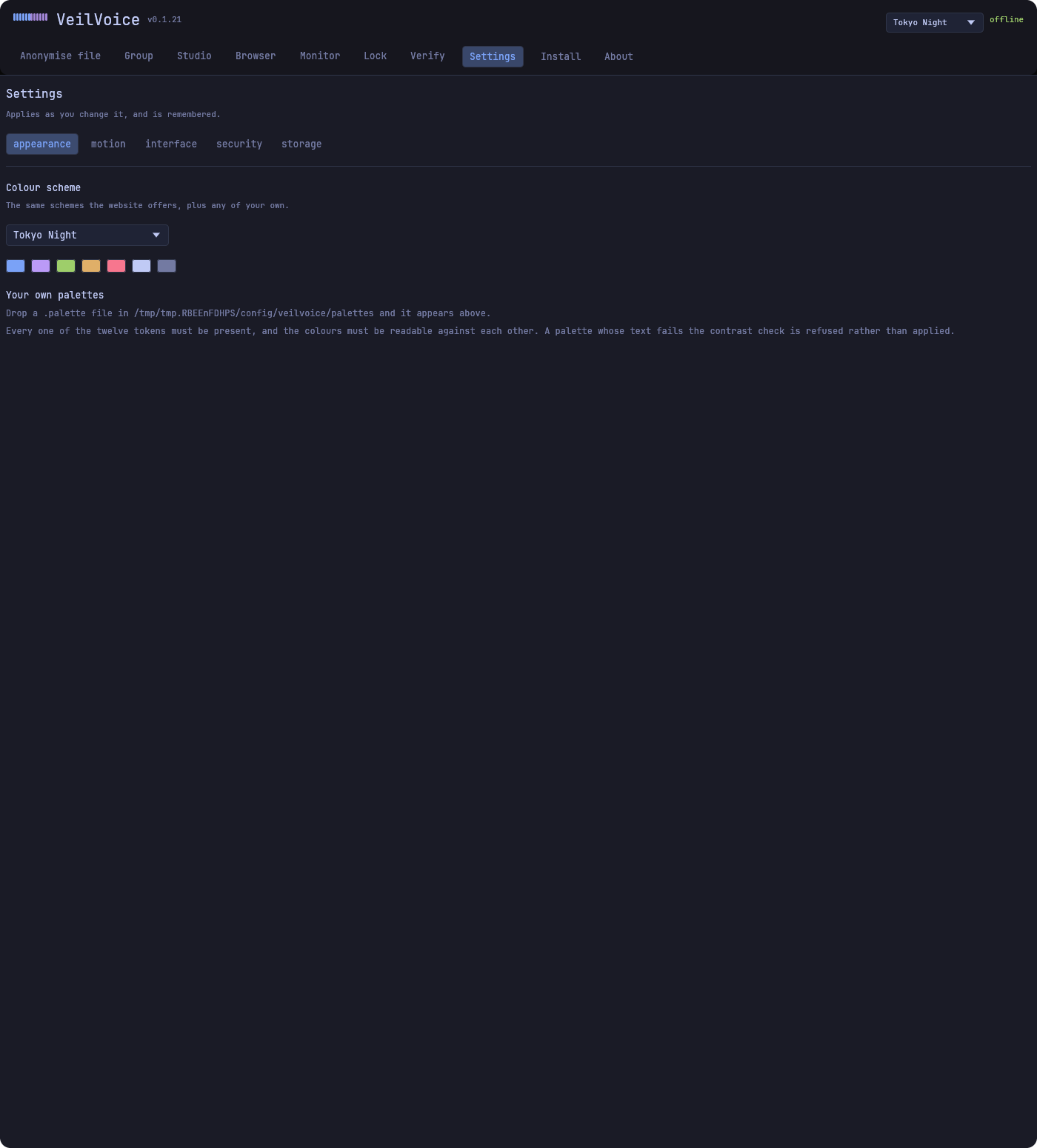
Photographs of the real window, one per tab. Pick a tab and its picture is below. These are captures of the program running, not drawings of it, and the build re-takes them so a screen that changes cannot leave a stale picture here.
VERIFY A DOWNLOAD
Drop the file you downloaded here. It is hashed locally, in your browser, using the built-in WebCrypto API, so there is no upload and no server that could receive it. Read js/verify.js; that file is the whole implementation.
The stronger check: the signature
A hash proves the file matches a list. The signature proves the list came from the maintainer. Browsers cannot verify OpenPGP, so this part runs on your machine:
gpg --import veilvoice-signing-key.asc
gpg --verify SHA256SUMS.asc SHA256SUMS
sha256sum -c SHA256SUMS --ignore-missing
Signing key fingerprint. Check that gpg --verify names this
exact key, not merely “a good signature”:
download the public key. The
user ID is exactly tilas01, with no e-mail address attached.
Or let it do all of that for you
veilvoice verify is built into the program itself: it ships in
every release because veilvoice does, and it needs no installer
and no separate download. Open a terminal in the folder you downloaded to
and run it, or open the desktop application's verify tab
and drop the archive on the window. One press does all four steps:
- the signature over
SHA256SUMS; - the archive, against
SHA256SUMS; CONTENTS.sha256, againstSHA256SUMS;- every file you extracted, against
CONTENTS.sha256, and it names anything in that folder the release never published.
Step 4 is the one worth having. A hash over the archive tells you the zip is genuine; this tells you the program you are about to run is. Releases before v0.1.15 carry no contents list and are checked as far as step 2, which it says at the time.
If GnuPG is on your machine it is used as well: the key is added to your
keyring, gpg --verify is run, and what GnuPG said is shown.
The signature is then checked by two independent implementations. The
commands above are still printed for you to run yourself, because a
program telling you a download is genuine came out of that download,
only you typing them makes the answer independent of it.
Every one of those commands, written out with what each answer proves, sits with the release you are downloading: the whole check in one line, the signature over the hash list on its own, one file against that list, one file against a hash with no list at all, the desktop application's three slots, and the build that answers the harder question. Every command there is checked against the program's own help when the page is generated.
SECURITY, IN FULL
Why the transform cannot be undone
Three independent mechanisms, each individually lossy. Reversing the output means defeating all three.
| Mechanism | What it destroys |
|---|---|
| Phase discard | Every frame's measured phase is thrown away and a synthetic one generated. Phase encodes the exact waveform and the speaker's micro-timing. It is never stored, and infinitely many waveforms share any given magnitude spectrogram. |
| Many-to-one normalisation | Pitch register, vocal-tract length and long-term spectral tilt are each collapsed onto a single canonical value. A whole population of speakers maps to the same output, so there is nothing to invert. |
| CSPRNG modulation | The residual transform changes every frame from a ChaCha20 stream whose seed comes from the OS CSPRNG, lives only in page-locked RAM, and is zeroized on drop. There is no fixed transform to undo. |
| Rolling seed | Every two seconds by default the stream draws a fresh seed from its own output and restarts. ChaCha20 does not run backwards, so each roll permanently seals off the audio before it: a long recording is a chain of short streams, not one. Configurable, and inaudible: parameters glide across a roll and phase offsets ease over half a second. |
At-rest encryption
| Layer | Primitive | Why |
|---|---|---|
| Password → key | Argon2id (RFC 9106) | Memory-hard, so GPU and ASIC cracking gains little. Cost parameters travel with the file so old files still open. |
| Public-key | X25519 + ML-KEM-768 hybrid | An attacker must break both. Guards against harvest-now-decrypt-later: a recording stored today may be attacked decades from now. |
| Payload | XChaCha20-Poly1305 | 192-bit random nonces remove the counter-management failure mode entirely. |
| Header | Authenticated as associated data | An attacker cannot downgrade the stored KDF cost to make cracking cheap, because tampering makes decryption fail. |
| Keys in memory | Page-locked, zeroized, constant-time | Keys stay out of the swap file and are wiped on drop. Comparison leaks no timing. |
Stated plainly: page-locking keeps keys off disk, not away from an attacker who can already read this process's memory, and hibernation writes RAM to disk wholesale and defeats it. A passphrase still sitting in a text field has not reached that protection yet, which is why it is wiped the moment it is used.
Recordings are sealed in memory and written once. An encrypted recording never exists on disk in the clear, because a plaintext file that is written and then deleted cannot be reliably taken back on flash storage.
The app lock, and exactly what it is worth
VeilVoice can sit behind a password of its own, separate from the one that encrypts recordings, so that opening the app is not the same act as unsealing everything it has written.
| What it is | What that means |
|---|---|
| An Argon2id verifier, not a key | A password hash is stored and compared in constant time. It encrypts nothing, because there is nothing local it could usefully encrypt. |
| Rate limited, and the limit persists | Three attempts are free; then the wait doubles from 5 s to a 15-minute cap. The count is written to disk after every attempt, so killing the app does not hand an attacker a fresh budget. |
| Domain separated | Type the same passphrase in both places and you still do not end up with two copies of one value. |
Not tamper-proof, and it cannot be. A local application has nowhere to hide a secret from the machine it runs on. Anyone who can write to your files can delete the lock; anyone holding the disk can edit the attempt counter, move the clock, or attack the stored hash offline. This protects against casual access, meaning the person who sits down at your unlocked session. If the disk is the threat, the answers are full-volume encryption and the at-rest encryption above, not this.
Libre, and what that buys you
- GPL-3.0-or-later. You may use, study, modify and redistribute it; derivatives stay free under the same terms.
- No
unsafeanywhere. Every crate carries#![forbid(unsafe_code)], including the page-locking path. Whole classes of memory-corruption bugs are impossible by construction. - Offline by construction. No telemetry and no accounts, and CI fails the build if an HTTP client so much as enters the dependency graph. One thing reaches the network and only when you press it: the desktop app's check for updates button, which runs then and at no other time, sends nothing about you, and downloads nothing. It borrows your system's own transfer tool, exactly as the release verifier does.
- Reproducible. Pinned toolchain, committed lockfile, path-remapped builds. Rebuild a release and confirm it matches, byte for byte.
- Artwork generated from source. Every icon and the banner come out of a readable script, not a committed binary blob.
- This website too. No CDN, no web fonts, no analytics, no cookies. The only third-party request is the optional repository panel, and it is a button you press.
Audited by tilas01, the author, who wrote and reviewed it. Be clear about what that is worth: a maintainer audit catches what the author can see, and no external firm or independent researcher has reviewed this code. The cryptography uses standard, well-reviewed primitives rather than anything invented here, and the de-identification argument is verifiable by reading two source files. Until an independent review exists, the source is the strongest verification available to you.
THE REPOSITORY, LIVE
This panel fetches from api.github.com, which learns your IP
address. GitHub already serves this page, so for most visitors that
changes nothing, but it is your call, so nothing loads until you ask.
The README renders here once loaded.